
SOLUTIONS
Single Sign-On
The anatomy of a single sign-on solution based on biometric authentication
Business Need
Typical application landscapes in the corporate environment consist of a mix of smart-client and web-based applications, many with their own, proprietary user security, some externally hosted ‘in the cloud’ and others in the own data centre.
Maintaining desperate user identities across many systems, with their different authentication methods and passwords has not only become an administrative nightmare for the CIO, but also a security risk. Users have too many passwords to remember them, and with passwords having to be changed every 30 days or so on many systems, more people than not write down their passwords.
The answer to this need is (and has been for many years) single sign-on, mostly abbreviated as SSO.
Single sign-on is no longer a nice to have, it has become a security necessity.
SSO has been talked about and implemented for many years, there are many approaches and products to choose from. But what does it all mean?
Single sign-on (SSO) is a property of access control of multiple related, yet independent, software systems. With this property, a user logs in with a single ID and password to gain access to a connected system or systems without using different usernames or passwords, or in some configurations seamlessly sign on at each system. This is typically accomplished using the Lightweight Directory Access Protocol (LDAP) and stored LDAP databases on (directory) servers.(1)
Common Schemes
Common schemes used are:
- Kerberos-based authentication, where a user signs in and obtains a Kerberos ticket-granting ticket. This is often handled by the operating system, transparent to the user. Other software applications, which require authentication, can then use this ticket-granting ticket to acquire their own service tickets, proving the user’s identity without prompting the user to re-enter credentials. Kerberos-based authentication is widely used by Windows (Windows-integrated authentication) as well as on Unix and Linus systems.
- Smart-card based authentication, where the initial sign-on prompts the user for the smart card. acquire software applications then also use the smart card, without prompting the user to re-enter credentials. Smart card-based single sign-on can either use certificates, biometric samples, or passwords stored on the smart card.
- Security Assertion Markup Language (SAML), where the user initially signs-on to a central identity provider, which then shares the assertion with participating software applications, called service providers. SAML implements genuine federated authentication across web-based cloud services.
- Mobile devices are increasingly used to log onto multiple systems, through the use of authentication methods like OpenID Connect and SAML. In essence, the mobile device takes the role of the security token carrier, very much like a smart-card.
Risk and Criticism
Biometric authentication is based on what the user is, and it cannot be lost, forgotten, shared, or duplicated.
Although single sign-on is a convenience to users as well as an operational simplification for IT departments, it present great risks to enterprise security. An attacker who gains control over a user’s SSO credentials will be granted access to every application the user has rights to, therefore increasing the amount of potential damage.
In order to avoid malicious access, it’s essential that every aspect of SSO implementation be coupled with identity governance. Passwords alone cannot effectively mitigate the security risk. Multi-factor authentication becomes a must to increase identity protection.
The safest form of authentication is biometric authentication. It does not rely on what the user knows (a password) or what the user has (a smart-card). Either one can be easily compromised, users write down their passwords or lose or even share their smart-cards.
Anatomy of a biometric single sign-on solution
Irrespective of the specific business requirements or processes, a biometric verification or authentication solution will need to consider most or all of the components shown in the diagram below.
It starts with biometric logon to the user workstation or device. Secure, multi-factor authentication for employees and users is becoming more of a necessity than an optional nice-to-have. Passwords are no longer considered sufficient. If user identity is secured from the entry point, the security architecture starts on a strong foundation.
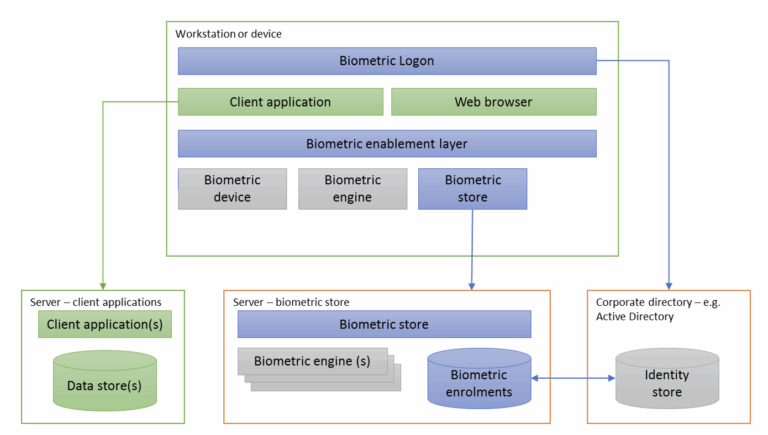
For client applications, be that smart-client applications or apps, or web-based applications to benefit from strong authentication, they must be biometrically enabled. A generic, reusable biometric enablement layer creates an enterprise standard, whereas all client applications participate in the same authentication scheme, avoiding duplication and operational complexity.
Depending on the nature of the business, the client application layer might introduce the next challenge, that not only internal users, but also clients shall be biometrically enrolled and verified against their enrolment. Clients are normally not represented in the corporate directory, and are therefore authenticated differently, using external means of identification (Identity document), or client cards (such as bank cards). Nevertheless, to ensure providing the correct service level to the correct person, strong authentication is required. Client biometric verification closes that gap.
The shared biometric store provides a secure hub for verification and identification for both internal users and clients. The biometric store liaises with client applications, through the biometric enablement layer, to provide enrolment services, identification services, and verification services to enabled applications.
Bibliography
- SSO and LDAP Authentication. Authenticationworld.com. [Online] http://www.authenticationworld.com/Single-Sign-On-Authentication/SSOandLDAP.html.
Relevant Produts